I wanted to see my real (dollar) token cost and usage limits at a glance while I work with Claude Code. Here’s how I set it up.
First, some background. Every message you send to Claude is measured in tokens (roughly, chunks of text). If you’re on a paid plan like Max, Anthropic doesn’t charge per token. Instead it gives you a budget that refills on two timers: a 5-hour session limit and a weekly limit. Run out, and you have to wait for the next reset.
That makes it easy to burn through your budget without realising. A heavy planning session eats far more tokens than lighter implementation work, so it helps to know where you stand before you hit a wall. For a while, the only way to check was to open a separate usage panel and switch back and forth. Now Claude Code can show it all right in the status bar at the bottom of your terminal.
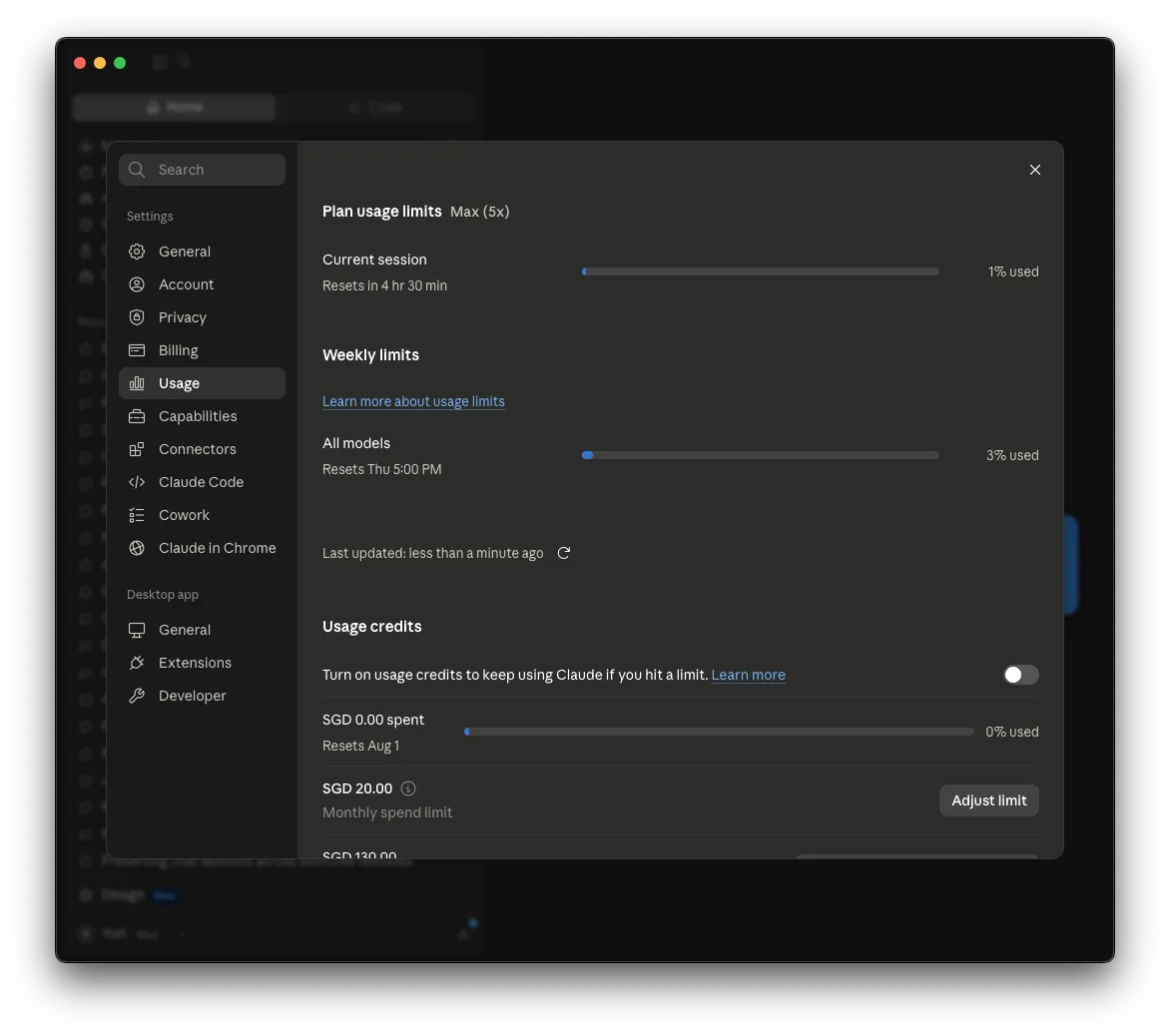
There’s a longer-term reason to watch this, too. Right now AI tokens are cheap, practically subsidised, because these companies are spending investor money to win users. That won’t last forever. When the bubble pops and every prompt costs what it actually costs, it’s better to already be in the habit of watching what you spend. So let’s get that number on screen.
How does Claude Code display usage?
Claude Code has a status line, a single line of text at the bottom of the screen. You point it at a small script of your own, and each time the conversation updates, Claude Code hands that script a bundle of live data (as JSON) about your session. Your script picks out the bits it cares about and prints one line back. Whatever it prints is what you see.
Wire it up in ~/.claude/settings.json:
{
  "statusLine": {
    "type": "command",
    "command": "bash /Users/you/.claude/statusline-command.sh",
    "padding": 0,
    "refreshInterval": 10
  }
}
What can I show?
The data Claude Code hands your script carries everything you need:
.context_window.used_percentage: how full the current context is.rate_limits.five_hour.used_percentage: your 5-hour session limit.rate_limits.seven_day.used_percentage: your weekly limit.cost.total_cost_usd: the running cost of this session
Read them with jq and glue them into a string:
input=$(cat)
used=$(echo "$input" | jq -r '.context_window.used_percentage')
cost=$(echo "$input" | jq -r '.cost.total_cost_usd')
printf "ctx:%.0f%%  \$%.2f" "$used" "$cost"
Read the docs on available data for status line to customise further.
What about daily and weekly totals?
Session cost is only half the story. For per-day and per-week spend, incorporate ccusage. ccusage reads local usage data from coding agent CLIs and turns it into daily, weekly, monthly, and session reports.
ccusage daily --json --since 2026-06-24
Cache its output for a minute so you’re not re-running it on every keystroke, then sum the totals with jq.
That’s it. Your context, limits, reset times, and running cost now sit at the bottom of the screen, updating as you work. When tokens finally get pricey, you won’t be flying blind.
I’ve also added a cherry on top by colour coding the output. Green when there is enough time, yellow, and red when the session or tokens are about to expire.

Here is the full script for /Users/you/.claude/statusline-command.sh:
#!/bin/sh
# To install dependencies, use brew:
# brew install jq ccusage
input=$(cat)

branch=$(git -C "$(echo "$input" | jq -r '.workspace.current_dir')" --no-optional-locks rev-parse --abbrev-ref HEAD 2>/dev/null)
model=$(echo "$input" | jq -r '.model.display_name')
used=$(echo "$input" | jq -r '.context_window.used_percentage // empty')
session=$(echo "$input" | jq -r '.rate_limits.five_hour.used_percentage // empty')
session_reset=$(echo "$input" | jq -r '.rate_limits.five_hour.resets_at // empty')
weekly=$(echo "$input" | jq -r '.rate_limits.seven_day.used_percentage // empty')
weekly_reset=$(echo "$input" | jq -r '.rate_limits.seven_day.resets_at // empty')
session_cost=$(echo "$input" | jq -r '.cost.total_cost_usd // empty')

ESC=$(printf '\033')
GREEN="${ESC}[32m"
YELLOW="${ESC}[33m"
RED="${ESC}[31m"
RESET="${ESC}[0m"

session_pct_color=""
if [ -n "$session" ]; then
  if [ "$session" -lt 60 ]; then
    session_pct_color="$GREEN"
  elif [ "$session" -le 90 ]; then
    session_pct_color="$YELLOW"
  else
    session_pct_color="$RED"
  fi
fi

session_reset_at=""
session_reset_in=""
session_time_color=""
if [ -n "$session_reset" ]; then
  session_reset_at=$(date -r "$session_reset" +%H:%M 2>/dev/null)
  now=$(date +%s)
  remaining=$((session_reset - now))
  if [ "$remaining" -gt 0 ]; then
    hours=$((remaining / 3600))
    mins=$(((remaining % 3600) / 60))
    if [ "$hours" -gt 0 ]; then
      session_reset_in="${hours}h${mins}m"
    else
      session_reset_in="${mins}m"
    fi
    if [ "$remaining" -gt 7200 ]; then
      session_time_color="$GREEN"
    elif [ "$remaining" -ge 3600 ]; then
      session_time_color="$YELLOW"
    else
      session_time_color="$RED"
    fi
  fi
fi

weekly_days_left=""
if [ -n "$weekly_reset" ]; then
  now_epoch=$(date +%s)
  weekly_remaining=$((weekly_reset - now_epoch))
  if [ "$weekly_remaining" -gt 0 ]; then
    weekly_days_left=$(( (weekly_remaining + 86399) / 86400 ))
  fi
fi

today_cost=""
week_cost=""
if [ -n "$weekly_reset" ]; then
  week_start_epoch=$((weekly_reset - 7 * 24 * 3600))
  week_start=$(date -r "$week_start_epoch" +%Y-%m-%d 2>/dev/null)
  today_date=$(date +%Y-%m-%d)
  cache_file="/tmp/statusline-ccusage-cache.json"
  cache_max_age=60

  refresh_cache=1
  if [ -f "$cache_file" ]; then
    age=$(( $(date +%s) - $(stat -f %m "$cache_file" 2>/dev/null || echo 0) ))
    [ "$age" -lt "$cache_max_age" ] && refresh_cache=0
  fi

  if [ "$refresh_cache" = "1" ]; then
    (ccusage daily --json --since "$week_start" > "${cache_file}.tmp" 2>/dev/null && mv "${cache_file}.tmp" "$cache_file") &
  fi

  if [ -f "$cache_file" ]; then
    today_cost=$(jq -r --arg today "$today_date" '[.daily[] | select(.period == $today) | .totalCost] | add // empty' "$cache_file" 2>/dev/null)
    week_cost=$(jq -r '[.daily[].totalCost] | add // empty' "$cache_file" 2>/dev/null)
  fi
fi

output="🇺🇦"

[ -n "$branch" ] && output="$output $branch"
[ -n "$model" ] && output="$output  $model"
[ -n "$used" ] && output="$output  ctx:$(printf '%.0f' "$used")%"
[ -n "$session" ] && output="$output  5h:${session_pct_color}$(printf '%.0f' "$session")%${RESET}"
[ -n "$session_reset_at" ] && output="${output}→${session_reset_at}"
[ -n "$session_reset_in" ] && output="${output} ${session_time_color}(${session_reset_in})${RESET}"
[ -n "$weekly" ] && output="$output  7d:$(printf '%.0f' "$weekly")%"
[ -n "$weekly_days_left" ] && output="${output} (${weekly_days_left}d)"
[ -n "$session_cost" ] && output="$output  sess:\$$(printf '%.2f' "$session_cost")"
[ -n "$today_cost" ] && output="$output day:\$$(printf '%.2f' "$today_cost")"
[ -n "$week_cost" ] && output="$output wk:\$$(printf '%.2f' "$week_cost")"

printf "%s" "$output"
Install this with a prompt
Paste this prompt into Claude Code and it’ll do the whole thing, following the same steps from this article. Steps described are for a Mac, and Claude will try to adapt the script if you’re on a different OS.
Set up a custom status line for Claude Code that shows my live token usage and cost. Use the full script exactly as is on this tutorial: https://yurikoval.com/blog/monitoring-claude-code-token-usage.html

1. Install the dependencies with Homebrew: jq and ccusage.
2. Create a shell script at ~/.claude/statusline-command.sh. It should read the JSON that Claude Code sends on stdin and print ONE status line containing:
   - the current git branch and the model display name
   - context window used percent (.context_window.used_percentage)
   - the 5-hour session limit used percent and its reset time (.rate_limits.five_hour)
   - the 7-day weekly limit used percent and days remaining (.rate_limits.seven_day)
   - the running session cost (.cost.total_cost_usd)
   - today's and this week's total cost from "ccusage daily --json", cached for about 60 seconds so it isn't re-run on every update
   Colour the session and weekly numbers green / yellow / red as they get close to the limit or reset.
3. Register the script in ~/.claude/settings.json under a "statusLine" block of type "command" that runs it with bash.
4. Make the script executable and show me the resulting status line.
Happy vibe coding!